Creating Embeds
Create, configure, and deploy Formula Bot embedded chat widgets on your website. Get the iframe code with responsive sizing and installation examples.
Learn how to create, manage, and deploy embeddable Formula Bot chat widgets on your website.
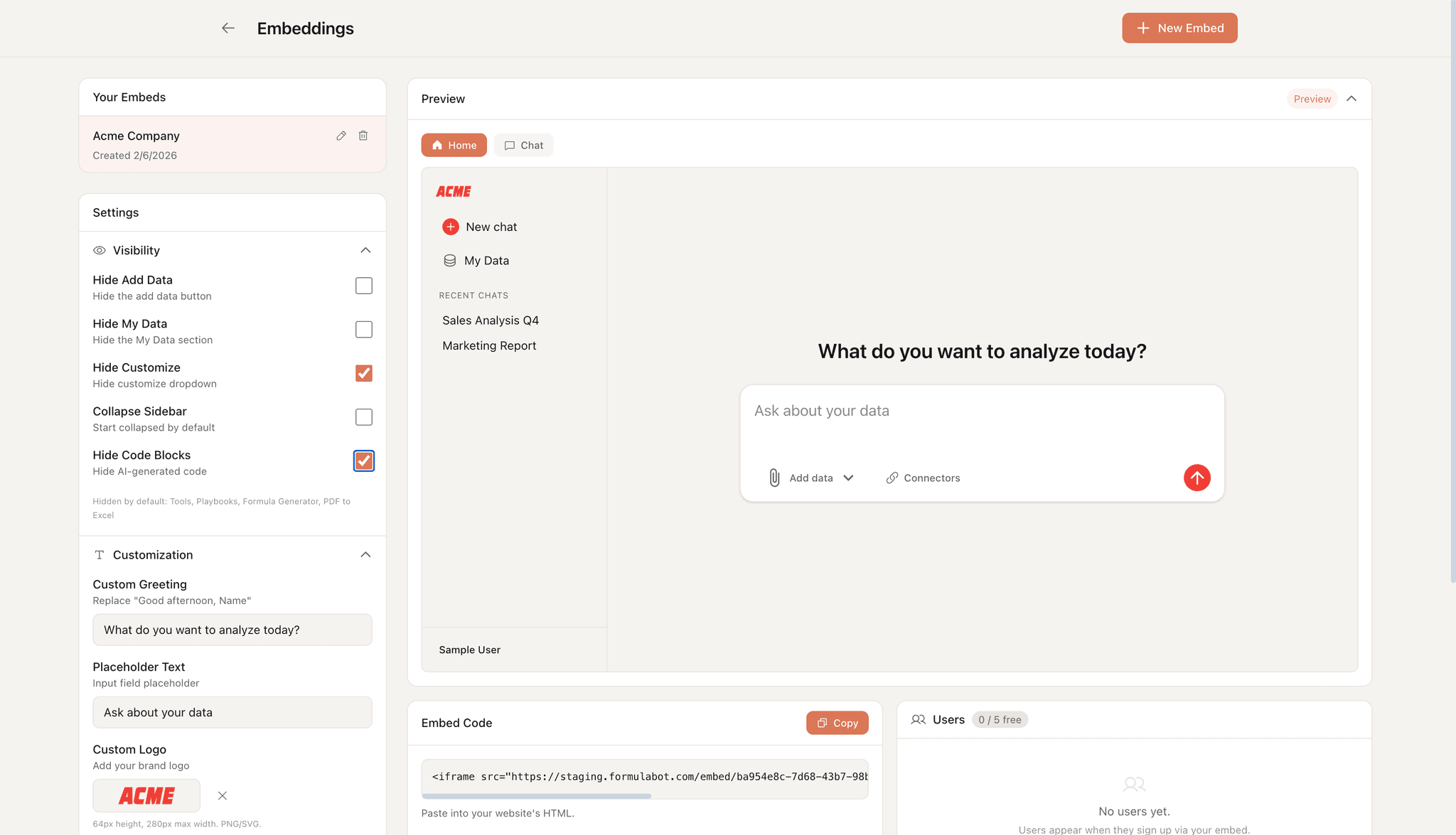
Accessing the Embeddings Dashboard
- Log in to Formula Bot
- Click Embeddings in the sidebar
- You'll see the Embeddings management dashboard
Embeddings are available on Max and Enterprise plans. The number of embeds and customization options depend on your plan.
Creating a New Embed
- Click the New Embed button in the top-left
- A new embed is created with the default name "New Embed"
- The embed is automatically selected and ready for configuration
Managing Embeds
Renaming an Embed
- Click the pencil icon next to the embed name
- Enter your new name
- Click outside the input or press Enter to save
Selecting an Embed
Click any embed in the list to select it. The selected embed shows with an orange highlight, and its configuration appears in the right panel.
Deleting an Embed
- Hover over the embed you want to delete
- Click the trash icon
- Confirm the deletion
Deleting an embed is permanent. Any websites using that embed's code will no longer work.
Getting the Embed Code
Once you've configured your embed:
- Find the Embed Code section in the right panel
- The iframe code is displayed in a code block
- Click the Copy button to copy to clipboard
The embed code looks like this:
<iframe
  src="https://analytics.formulabot.com/embed/your-embed-id"
  width="100%"
  height="600"
  frameborder="0">
</iframe>
Embedding on Your Website
Basic Installation
Paste the iframe code wherever you want the chat to appear in your HTML:
<div class="chat-container">
  <iframe
    src="https://analytics.formulabot.com/embed/your-embed-id"
    width="100%"
    height="600"
    frameborder="0">
  </iframe>
</div>
Responsive Sizing
For a full-height embed, use CSS:
<style>
  .chat-container {
    width: 100%;
    height: 100vh;
  }
  .chat-container iframe {
    width: 100%;
    height: 100%;
    border: none;
  }
</style>
Fixed Position Widget
For a floating chat widget in the corner:
<style>
  .chat-widget {
    position: fixed;
    bottom: 20px;
    right: 20px;
    width: 400px;
    height: 600px;
    box-shadow: 0 4px 12px rgba(0,0,0,0.15);
    border-radius: 12px;
    overflow: hidden;
  }
</style>
Best Practices
Sizing
- Minimum recommended height: 500px
- For full functionality, use at least 600px height
- Width should be at least 350px for mobile compatibility
Performance
- Load the iframe after your main content for better page performance
- Consider lazy loading for embeds below the fold
Security
- Only embed on domains you control
- The embed URL is unique to your account
Next Steps
- Customization - Brand your embed with custom colors and logos
- Users & Connectors - Manage user access and data