SQL Feedback
Rate AI-generated SQL queries as correct or incorrect to improve accuracy over time. Feedback trains Formula Bot on your specific database schema.
When you connect a SQL database to Formula Bot, the AI generates SQL queries to answer your questions. You can help improve the accuracy of these queries by providing feedback directly in the chat.
Why Feedback Matters
Every database has unique schemas, naming conventions, and business logic. By marking queries as correct or incorrect, you teach the AI how your specific database works. Over time, this leads to more accurate queries tailored to your data.
How to Provide Feedback
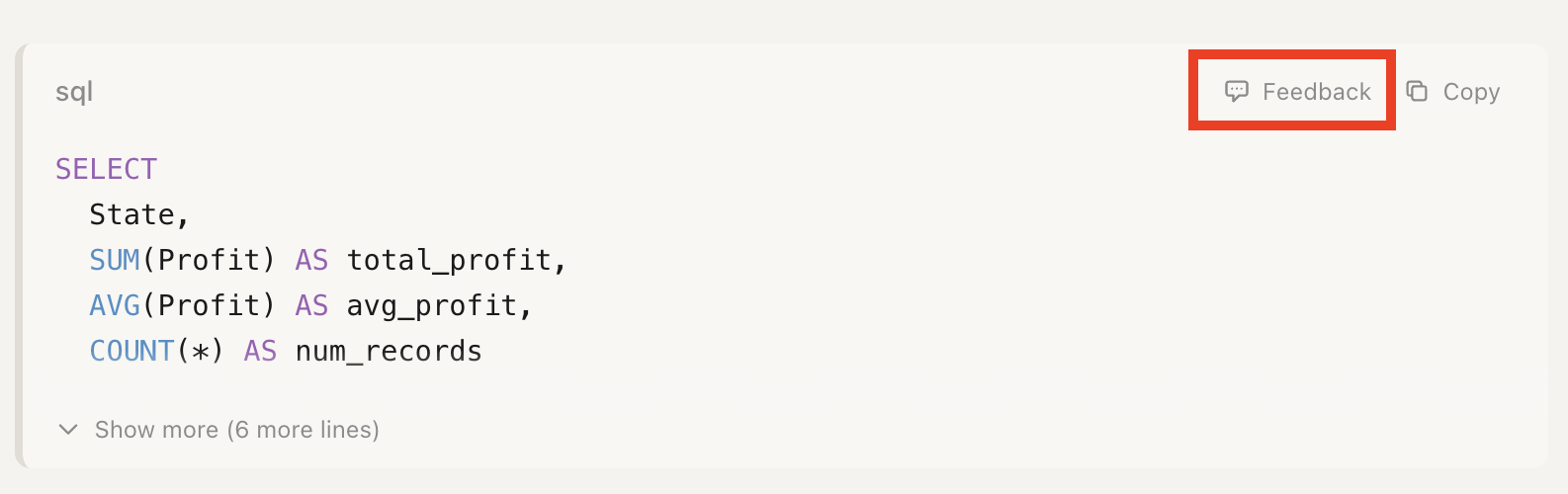
When the AI generates a SQL query, you'll see a Feedback button next to the code block:
-
For correct queries: Click the thumbs up icon. The feedback is recorded immediately.
-
For incorrect queries: Click the thumbs down icon, then provide a brief explanation of what was wrong. For example:
- "Missing GROUP BY clause"
- "Should use LEFT JOIN instead of INNER JOIN"
- "Wrong date format for this database"
Be specific
The more specific your feedback, the better the AI can learn. Instead of just "wrong", explain what should be different.
What to Provide Feedback On
Good candidates for feedback include:
- Incorrect joins - Wrong join type or missing join conditions
- Missing clauses - Forgotten GROUP BY, ORDER BY, or WHERE conditions
- Wrong column names - AI guessed a column name incorrectly
- Business logic errors - Query logic doesn't match how your business works
- Performance issues - Query works but could be optimized
Managing Your Feedback
All your feedback is saved as "annotations" for each data connector. You can view and manage these in the Knowledge Base settings:
- Go to Connectors in the sidebar
- Select your SQL connector
- Click Knowledge Base
- Scroll down to see your SQL Query Annotations
From here you can:
- Review past feedback you've provided
- Delete annotations that are no longer relevant
How It Works
When you submit feedback:
- Your feedback is saved to your connector's annotation history
- When the AI generates new SQL queries, it references your past feedback
- Positive examples show the AI what works; negative examples (with reasons) show what to avoid
This creates a feedback loop where the AI continuously improves for your specific database.
Privacy note
Feedback is stored securely and only used to improve queries for your own connectors. Your feedback is never shared with other users.
Best Practices
- Provide feedback consistently - The more examples, the better the learning
- Include context - When marking incorrect, always explain why
- Review annotations periodically - Remove outdated feedback if your schema changes
- Be patient - Improvement is gradual as the AI learns your patterns
Next Steps
- Learn about Knowledge Bases for uploading schema documentation
- Configure Data Access to control what the AI can query